
The Essential Guide to Monitor Arms: Elevating Your Workspace Ergonomics
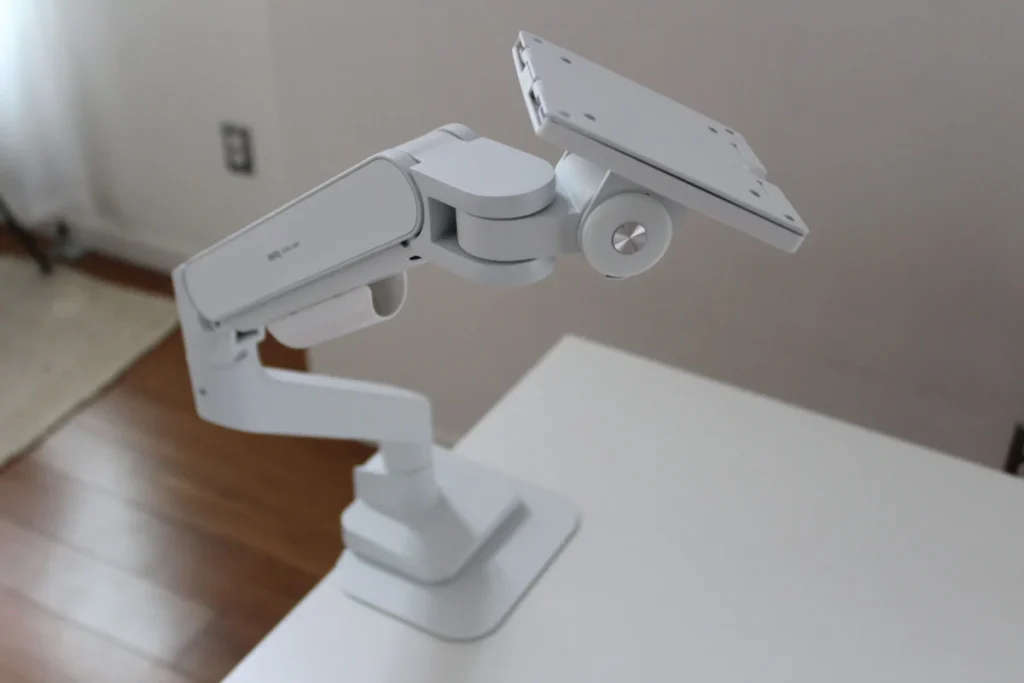
In the modern digital landscape, the way we interact with our screens is fundamentally changing. As professional workflows shift toward high-resolution ultrawide displays and multi-monitor setups, the humble monitor stand—the piece of plastic or metal that comes included in the box—is increasingly failing to meet the demands of the modern user.
For those who spend eight or more hours a day at a desk, the setup of your hardware is not just a matter of aesthetics; it is a critical component of physical well-being. Investing in a high-quality monitor arm is one of the most cost-effective ways to improve posture, reclaim valuable desk real estate, and enhance the fluidity of your workflow.
Main Facts: Why You Need a Monitor Arm
The transition from a standard factory stand to a specialized monitor arm is a game-changer for desk-bound professionals. The primary value proposition rests on two pillars: ergonomic flexibility and spatial optimization.
The Ergonomic Imperative
The standard stands that accompany most monitors are notoriously rigid. Often, they offer minimal height adjustment and lack the ability to tilt or rotate effectively. This forces users into suboptimal viewing angles, leading to "tech neck," eye strain, and general fatigue. A professional-grade monitor arm grants a full range of motion. It allows the screen to be positioned exactly at eye level, promoting an upright posture. Furthermore, the ability to pull a screen forward for detailed work or push it back for meetings provides a dynamic environment that static stands simply cannot replicate.
Reclaiming Your Real Estate
Desk space is a premium resource. Large monitor bases—particularly those required to support 34-inch ultrawide displays or 42-inch gaming monitors—consume a significant portion of a desk’s surface area. By replacing these bulky bases with a slim, clamp-based arm, you effectively "float" your display, clearing space for peripherals, notebooks, and documents.

Chronology of Testing and Industry Insights
Over the past year, our team has rigorously stress-tested a variety of mounting solutions to determine which options truly deserve a spot on your desk. The testing process involved assembly, long-term weight-bearing assessments, and evaluating the fluidity of mechanical versus gas-spring mechanisms.
The Heavy-Duty Performers
For users with massive screens, the Wali Heavy-Duty Monitor Arm ($75) has emerged as a reliable workhorse. When testing with a 42-inch KTC G42P5, the Wali arm maintained stability for over a year without any signs of "sag" or droop, proving that high performance does not always require a premium price tag.
For those requiring a dual-monitor setup, the Monoprice Workstream Single Monitor Arm ($83)—configured for dual-use—has demonstrated exceptional durability. Tested with a 32-inch ultrawide and a secondary vertical monitor, the arms maintained smooth motion even under substantial, prolonged tension. Its ability to clamp to exceptionally thick desks (up to 5 inches) makes it a standout for custom-built workstations.
Mid-Range and Niche Options
The Branch Monitor Arm ($129) offers a polished, minimalist aesthetic. However, our testing revealed that the market is heavily saturated with "white-label" products; the Branch arm shares nearly identical architecture with the BenQ Ergo Arm. While it is a solid choice, it lacks the protective reinforcement plates found in more comprehensive kits, which may be a point of concern for those with delicate wood-veneer desks.
On the higher end, the Mount-It! Heavy Duty Dual Monitor Arm ($322) remains a benchmark for quality. Capable of supporting up to 20 pounds per arm, it has served as a primary mount for 34-inch ultrawide displays, offering superior cable management and structural integrity that justifies the higher investment.

Supporting Data: Understanding the Hardware
Navigating the specifications of monitor arms can be daunting. To make an informed decision, one must look beyond the marketing copy and focus on the engineering.
Gas Springs vs. Mechanical Springs
- Gas-Spring Arms: These utilize nitrogen-filled cylinders to provide a counter-balance. They are the gold standard for fluidity. If you are the type of user who frequently adjusts their screen position throughout the day, the smooth, effortless motion of a gas-spring arm is well worth the extra cost.
- Mechanical/Spring-Assisted Arms: These rely on traditional tension coils. While they are often more affordable and durable over the long term, they can feel "stiff." These are best suited for "set-it-and-forget-it" users who do not need to move their monitor once it is positioned.
The Weight-Limit Buffer
A common pitfall is ignoring the weight capacity of the arm relative to the monitor. Curved monitors, in particular, shift the center of gravity forward, placing additional torque on the arm’s joints. As a rule of thumb, always include a 5-pound buffer when checking your monitor’s weight against the arm’s maximum load capacity to ensure long-term stability.
Official Considerations and Installation Criteria
Before purchasing, users must audit their existing environment. Not all desks or monitors are "arm-ready."
VESA Compatibility
The VESA (Video Electronics Standards Association) mount is the industry standard. Look for the four-screw pattern on the back of your display. While almost all modern monitors support this, ultra-budget displays under $200 may occasionally lack these mounting holes. Always verify your model’s specs before ordering.
Desk Integrity
Monitor arms exert significant concentrated pressure on the edge of your desk.

- Avoid: Glass surfaces, lightweight hollow-core desks (like some entry-level IKEA models), and desks with decorative trim that interferes with a flush clamp fit.
- Recommend: Solid wood or high-density composite desks. If you are worried about damage, a steel reinforcement plate is an essential, low-cost accessory to distribute the clamping force across a larger surface area.
Implications: The Future of the Workspace
The trend toward ergonomic optimization is not merely a fad; it is a response to the sedentary nature of modern professional life. As remote and hybrid work models become permanent fixtures of the global economy, the "home office" has evolved from a corner of a kitchen table into a complex, high-performance environment.
Looking ahead, the market for monitor arms is expected to bifurcate further. On one end, we see "boutique" manufacturers like Herman Miller and Humanscale focusing on premium materials, refined industrial design, and sophisticated, tool-less adjustment systems. On the other end, the "Amazon-native" market continues to grow, offering increasingly high-quality hardware at aggressive price points.
A Note on "Budget" Options
While the AmazonBasics Adjustable Desk Mount ($29) is popular due to its price, our testing suggests caution. Frequent reports of damaged packaging and shaky, inconsistent performance highlight the risks of bottom-of-the-barrel hardware. When it comes to supporting an expensive monitor, the potential for a catastrophic drop often outweighs the savings of a cheaper mount.
Conclusion: Making the Right Choice
When selecting your monitor arm, prioritize your specific use case. If you are a streamer or content creator who moves your display often, invest in a high-end gas-spring arm. If you are a developer or spreadsheet-heavy professional who requires a stable, fixed view, a robust mechanical arm will serve you perfectly.
The goal is a workspace that supports your work, rather than hindering it. By removing the clutter of bulky stands and optimizing your viewing angle, you aren’t just buying a piece of hardware—you are upgrading your professional longevity. As we continue to test emerging products from both established boutique firms and budget-friendly brands, the focus remains clear: stability, adjustability, and the protection of your most important tools.