The Fortified Digital Life: Why Password Managers Are No Longer Optional in 2026
Passwords remain one of the most stubborn paradoxes of the digital age: they are the primary barrier between our personal data and malicious actors, yet they are inherently designed to be flawed. A "good" password—long, complex, and unique—is nearly impossible for the human brain to store in bulk. Conversely, passwords that are easy to remember are, by definition, insecure.
As we navigate through 2026, the convenience-driven habit of using "123456," "password," or "admin" persists as a leading cause of digital compromise. While Memory Grand Masters like Ed Cooke can memorize hundreds of random character strings, the average user cannot. The solution isn’t better memory; it is the adoption of a professional-grade password manager.
The Evolution of Online Authentication
The history of the password is a long, tedious, and ultimately losing battle. Since the dawn of computer networking, developers have searched for ways to replace the static password. Yet, despite the rise of multi-factor authentication (MFA) and the push for "passwordless" systems, static credentials remain the backbone of the internet.

In recent years, the FIDO Alliance has led a concerted effort to standardize "passkeys"—cryptographic key pairs that replace passwords entirely. While passkeys are a significant leap forward, their adoption remains fragmented. Until every service provider and hardware manufacturer moves to a unified standard, the password manager acts as the necessary bridge, protecting our legacy logins while managing the new generation of passkeys.
Understanding the Password Manager Architecture
At its core, a password manager is a secure, encrypted vault. You provide one "Master Password," which acts as the key to unlock this vault. Once inside, the manager fills, generates, and organizes credentials for every service you use.
The gold standard for these services is the "zero-knowledge" or "zero-access" architecture. In this model, the service provider itself has no way to see or decrypt your data. Your passwords are encrypted locally on your device before they ever hit the provider’s servers. Even in the event of a total company data breach, an attacker would be left with nothing but unreadable, encrypted gibberish.
-SOURCE-Bitwarden.jpg)
Top Recommendations: The Best Password Managers of 2026
1. Bitwarden: The Best for Most People
Bitwarden has solidified its position as the premier choice for the average user. It is secure, polished, and—most importantly—open source. The transparency of open-source code allows independent researchers to audit the software for flaws, making it inherently more trustworthy.
- Key Features: Bitwarden offers comprehensive apps for Windows, macOS, Linux, iOS, and Android. It supports biometric authentication (Touch ID, Windows Hello) and is a leader in passkey support.
- The "Send" Factor: Its "Bitwarden Send" feature allows for the secure, time-limited sharing of sensitive files or text, making it a versatile tool beyond simple password storage.
- Self-Hosting: For the tech-savvy, Bitwarden can be hosted on a local server, keeping your data entirely off the provider’s cloud.
2. Proton Pass: The Best Free Tier
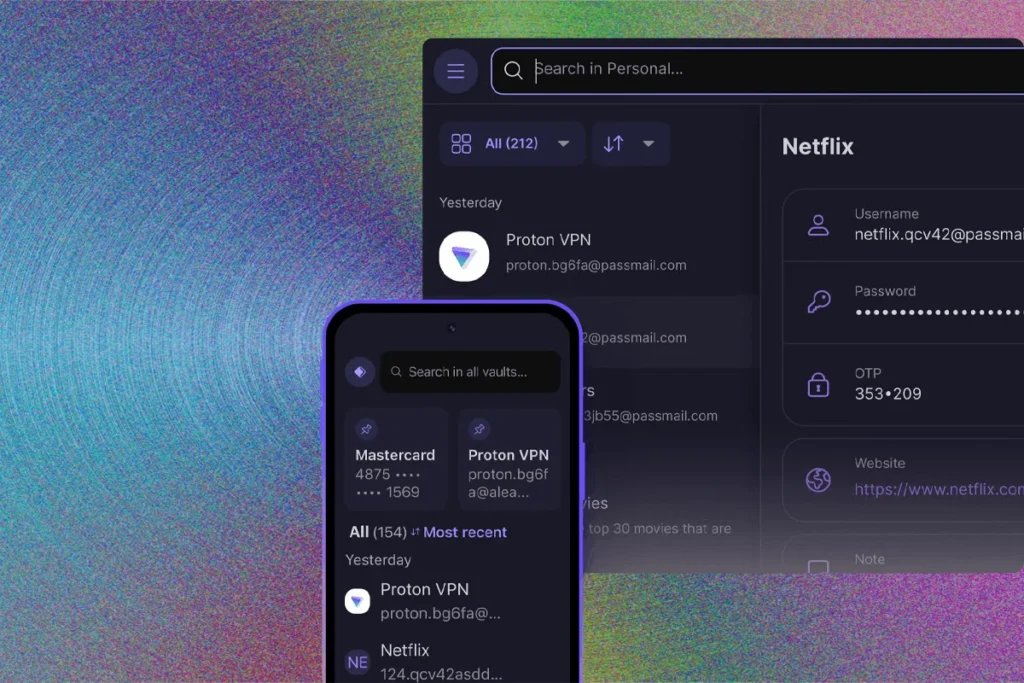
Proton has leveraged its reputation for privacy (built through Proton Mail and VPN) to create a formidable competitor. Their free tier is arguably the most generous on the market, offering unlimited logins and device syncing.
- Why it wins: If you are already integrated into the Proton ecosystem, the Pass browser extension is seamless. It provides essential security tools like "Pass Monitor," which alerts users to data breaches involving their stored credentials.
- Privacy Focus: While the server-side code is proprietary, the client-side apps are open source, maintaining a high standard of trust.
3. Keeper: The Enterprise Powerhouse
For users who need robust sharing capabilities, Keeper is the industry leader. It uses a folder-based permission structure similar to Google Drive, making it ideal for families or small businesses that need to share specific sets of credentials without handing over a master key.

- Security: Keeper’s enterprise pedigree means it is built to survive high-stakes environments, offering advanced features like self-destructing records and secure, one-time-use links.
4. 1Password: The Feature-Rich Contender
1Password is the premium choice for users who want a "do-it-all" utility. Beyond standard password management, its standout feature is "Travel Mode."
- Travel Mode: This allows users to remove sensitive vaults from their devices before crossing international borders, restoring them with a single click once they arrive. This is a critical security feature for journalists, business travelers, and activists.
- Authentication: 1Password functions as a robust 2FA authenticator, effectively replacing apps like Google Authenticator and centralizing your security footprint.
The Case Against Browser-Based Managers
Many users rely on the built-in password managers in Chrome, Safari, or Firefox. While these are certainly better than reusing passwords, they are inherently limited. Browser-based managers are often poorly secured; if an attacker gains access to your physical machine, they can often dump your entire password database with minimal effort.
Dedicated managers like Bitwarden or 1Password employ multiple layers of encryption and device-bound keys that browser managers simply do not match.
-SOURCE-Nordpass-(cropped).jpg)
DIY and Self-Hosted Options: For the Privacy Purist
For those who refuse to trust any cloud-based provider, self-hosted solutions like KeePassXC and Enpass offer total control.
- KeePassXC: This is a powerful, open-source, local-only manager. You keep the database file on your own drive, and you decide how to sync it—whether through a private cloud, a USB stick, or a home NAS.
- The Trade-off: With these tools, the responsibility is entirely yours. If you lose your database file and your master password, there is no "Forgot Password" button to save you. These tools are recommended only for users who are comfortable managing their own data backups and network security.
What to Avoid: The "LastPass" Warning
Not all password managers are equal. Our testing continues to advise against LastPass. Following a series of devastating data breaches in 2022 that were linked to millions of dollars in subsequent cryptocurrency theft, the company’s reputation has been irreparably damaged. Regardless of recent security improvements, the history of poor disclosure and the availability of superior, more transparent alternatives like Bitwarden makes recommending LastPass impossible.
Implications of a Compromised Vault
It is a common misconception that a password manager makes you a "single point of failure." In reality, a password manager is a "single point of security."

If you store 200 passwords in your head, you are using the same password for 200 sites. If one site is breached, your password is stolen, and your email, bank, and social media accounts are immediately at risk. With a password manager, each site has a unique, 16-character, randomly generated string. If one site is breached, the attacker gains access to nothing else.
Establishing a Secure Workflow
- Generate, Don’t Create: Use your manager’s built-in generator to create 16+ character, complex passwords for every single login.
- Enable 2FA: Even with a password manager, enable two-factor authentication on every site that offers it. Use a hardware key like a YubiKey for your most critical accounts (Email, Bank, and your Password Manager itself).
- Disable Autofill: While convenient, automatic form-filling can be exploited by malicious scripts. Configure your manager to require a manual click or a biometric prompt before it enters your data.
- Audit Regularly: Use your manager’s "Vault Health" or "Password Hygiene" reports to identify weak, reused, or compromised passwords that need to be updated.
Conclusion: The Path Forward
In 2026, the internet is not getting any safer. Phishing, credential stuffing, and data breaches are increasing in frequency and sophistication. A password manager is no longer a "power user" tool—it is a basic digital survival skill.
Whether you choose the open-source reliability of Bitwarden, the privacy-first approach of Proton Pass, or the feature-heavy ecosystem of 1Password, the most important step is the one you take today: stop memorizing, start securing, and stop reusing passwords. Your digital identity is far too valuable to leave to chance.