The Automation Revolution: How Apple Intelligence is Finally Making Shortcuts Accessible
For years, Apple’s Shortcuts app existed in a paradoxical space: it was one of the most powerful tools in the iPhone ecosystem, yet it remained a niche playground for tech-savvy power users. For the average consumer, opening the app felt like staring at a blank line of code; the daunting task of manual scripting often led to the app being relegated to a forgotten folder on the home screen. However, with the impending launch of iOS 27, Apple is dismantling the barrier to entry. By integrating Apple Intelligence directly into the automation framework, the Cupertino giant is transforming what was once a clunky, specialized utility into an essential, conversational assistant.
The Dawn of "Describe a Short"
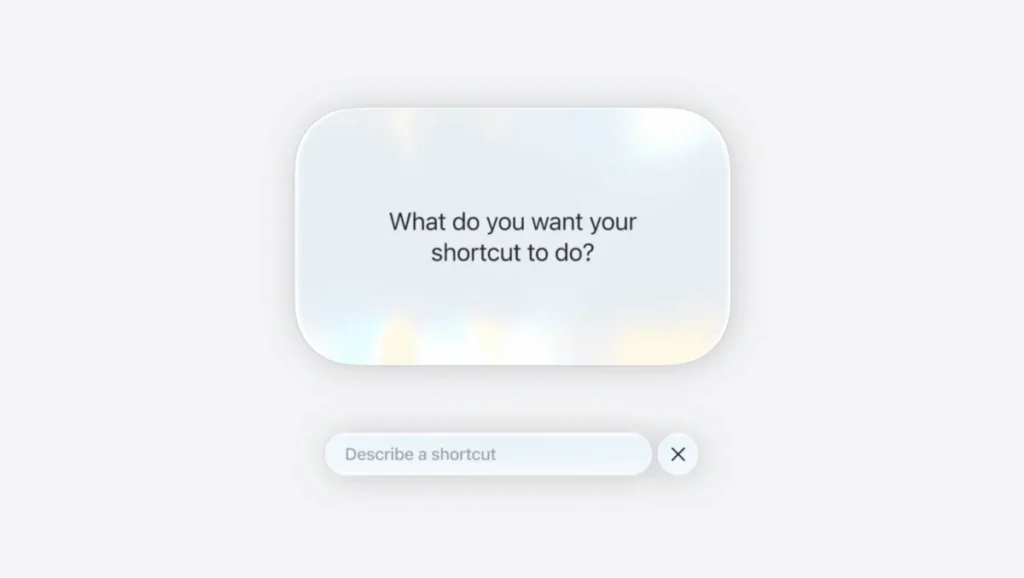
The headline feature of this update is a tool dubbed "Describe a Short." Leveraging the robust capabilities of Apple Intelligence, the feature allows users to articulate their automation needs in natural, conversational language. Instead of manually dragging and dropping logic blocks or configuring complex triggers, a user can simply state, "Send a text to my partner when I turn off airplane mode," and the app will build the underlying workflow automatically.
This shift marks a departure from traditional programming toward intent-based computing. While the manual scripting interface remains intact for those who enjoy the "under the hood" control, the new AI layer effectively bridges the gap for the average user. During beta testing, while minor glitches occurred—occasional logic gaps where the AI misinterpreted a complex multi-step request—the overall experience was transformative. The ability to refine these flows through follow-up prompts creates a collaborative environment between the user and the software, turning automation into a dialogue rather than a coding exercise.
Chronology of an Evolution
The history of Apple’s automation efforts is one of steady, albeit slow, consolidation. It began with the acquisition of Workflow in 2017, a third-party app that allowed users to chain together app actions. Apple integrated this into the core iOS experience as "Shortcuts" in 2018. Over the subsequent years, Apple slowly expanded the app’s reach, adding support for home automation via HomeKit, NFC tag triggers, and deep system settings.
However, the "steep learning curve" remained the primary hurdle. By 2024, it became clear that the next stage of mobile computing required a shift from manual input to predictive intelligence. The introduction of the iOS 27 beta represents the realization of that goal. By embedding the new Siri AI engine into the heart of the Shortcuts app, Apple is effectively training the OS to understand the "why" behind the user’s actions, not just the "how."
Supporting Data: Real-World Use Cases
To understand the utility of this new integration, one must look at how it solves specific, mundane friction points in daily life. Here are the most effective automations developed during the iOS 27 testing period, which illustrate the shift from manual labor to background intelligence.

Habit Breaking and Digital Wellness
One of the most persistent issues in the modern digital age is the "zombie scroll." Users frequently open apps like Instagram or X (formerly Twitter) out of pure muscle memory. By using the new AI-driven Shortcuts, users can create a "gatekeeper" flow. When the app detects that the user has opened a social media platform, it triggers a prompt: "Do you really want to use this app?" Choosing "No" triggers a sequence that closes the application and locks the screen. It is a simple, behavioral-nudge automation that helps users reclaim agency over their screen time without needing third-party parental control software.
Environmental Awareness
For users in urban environments, air quality is a significant health concern. Rather than manually checking weather apps, a user can now command the phone to: "Check the air quality every morning at 6:40 am and notify me if I need a mask." This removes the cognitive load of remembering to check the index, turning the phone into a proactive guardian of the user’s health.
Strategic Battery Management
Battery anxiety is a universal smartphone user pain point. A location-based shortcut—triggered when leaving a designated zone like a home or office—can check the battery percentage. If the charge is below a critical threshold, the phone generates a preemptive notification, reminding the user to grab a portable charger. This simple logic prevents the inconvenience of a dead phone in transit.
Streamlining Routine Chores
Household management is another area where Shortcuts shines. By logging data to a note, users can track recurring chores like watering plants. By adding a "Home Screen" widget that triggers a timestamp log, the chore becomes a one-tap action. Furthermore, a secondary automation can be set to "check" the log weekly; if no entry is found, the phone sends a reminder. This effectively turns the iPhone into a project manager for personal life.
Official Stance and Implications
Apple’s official documentation emphasizes that the "Describe a Short" feature is designed to respect user privacy, with the AI processing occurring either on-device or via the Private Cloud Compute infrastructure. During the WWDC announcements, Apple executives underscored that the integration of Apple Intelligence into Shortcuts is intended to make technology feel "invisible."
The implications of this are vast. As AI becomes a native component of the OS, the "app-centric" model of smartphone usage may begin to fade. If users can simply ask their phone to perform a task—such as "Extract text from my last five screenshots and put them into a summary email"—they no longer need to navigate individual photo editing or note-taking apps. The phone becomes a single, unified interface for action.

The Future of "Zero to Hero"
The feeling of watching a complex sequence of tasks unfold on its own—what one might call the "Zero to Hero" effect—is what makes this update so compelling. It gamifies productivity. When the device handles the mundane, the user is free to focus on creative or complex tasks.
While there are still hurdles—such as the occasional need for debugging or the limitations of third-party app integration—the trajectory is clear. As Apple continues to refine the large language models powering these automations, we can expect "Describe a Short" to become even more accurate and expansive.
For the user who has spent years ignoring the Shortcuts app, iOS 27 is the invitation to finally step inside. Whether it is pausing your music when a doorbell rings, or automating your travel updates, the barrier to entry has officially been removed. The era of the "smart" phone is finally living up to its name, evolving from a simple communication device into a truly autonomous personal assistant.
As the technology matures, the question for users will no longer be "how do I build this?" but rather "what do I want my phone to do for me today?" That shift in perspective is, perhaps, the most profound upgrade Apple has ever delivered.