
The "Dumb" Smartphone: How a Hidden Apple Feature is Revolutionizing Digital Parenting
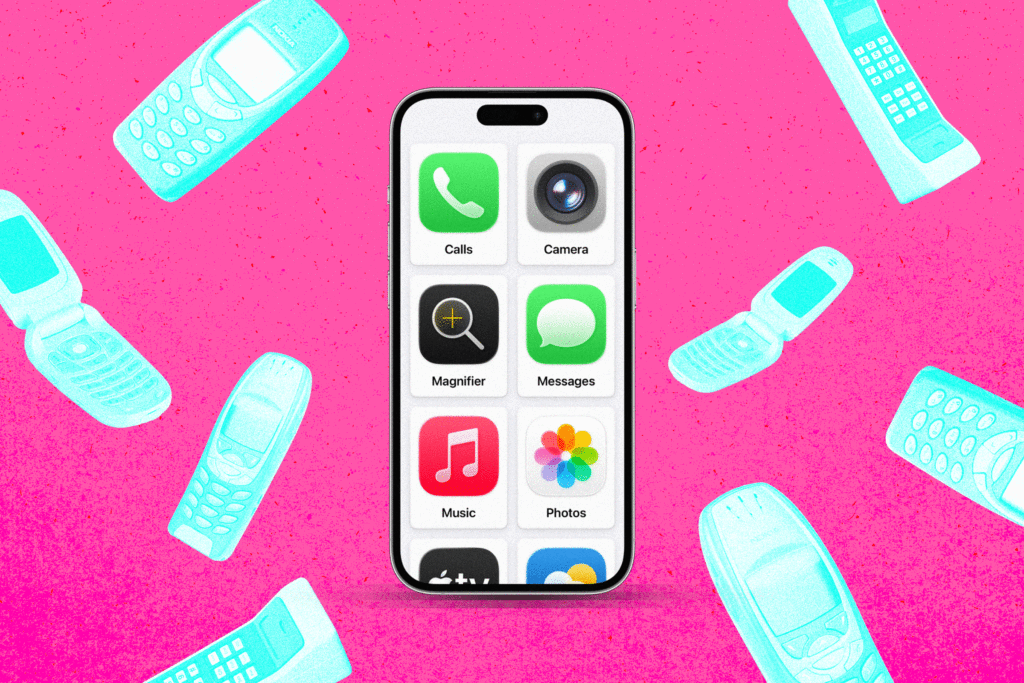
The dilemma of the modern parent is paradoxically high-tech: at what age should a child be granted the world of information, distraction, and potential danger that sits inside a smartphone? For many, the answer has been a steady march toward "dumb phones"—minimalist devices designed strictly for calling and texting. However, as urban navigation and safety tracking become non-negotiable for independent children, the limitations of these stripped-back handsets often leave parents stranded.
The solution, it turns out, is not in a new purchase or a third-party subscription, but in an obscure corner of the existing Apple ecosystem. By repurposing a dormant iPhone with a feature originally designed for accessibility, parents are effectively creating a bespoke, ironclad "dumb phone" that offers essential safety without the risks of the open internet.
The Problem: The Digital Minefield
The push for a "digital detox" for children is not merely a trend; it is a response to the growing recognition that unfettered access to the internet and social media can be detrimental to developmental health. Yet, the practical reality of modern parenting involves school commutes, extracurricular activities, and the need for constant, reliable communication.
Traditional "dumb phones"—like the retro-chic Nokia handsets—fail in this environment because they lack GPS navigation and reliable location tracking. Conversely, handing a child a fully functional iPhone creates a "screen time" battleground. While Apple offers robust parental controls, tech-savvy children often discover workarounds, such as clicking links sent by friends via messaging apps to bypass web filters. Furthermore, third-party apps promising to "dumb down" a smartphone often come with recurring monthly fees—a frustrating proposition for a device that is meant to represent a simplification of life.

A Hidden Solution: The Evolution of Assistive Access
The breakthrough lies in a feature called Assistive Access, introduced by Apple alongside iOS 17. Originally engineered to assist users with cognitive disabilities, the feature transforms the complex, icon-heavy iPhone interface into a simplified, high-contrast grid of large, intuitive tiles.
While Apple markets this feature for accessibility, its application as a parental control tool is unparalleled. By activating Assistive Access, a parent can whitelist only the essential applications—such as Phone, Messages, Maps, and Camera—while rendering the rest of the operating system inaccessible.
The Technical Implementation
Setting up an iPhone as a child-safe device via Assistive Access is a straightforward, albeit buried, process:
- Accessing the Menu: Navigate to Settings > Accessibility, then scroll to the General section to find Assistive Access.
- Configuration: Upon initial setup, choose the "Grid" layout to maximize the size of the app icons.
- App Selection: Carefully curate the allowed apps. By omitting Safari, Chrome, or any web-browsing application, the parent effectively removes the internet from the device.
- Security Measures: Set a unique four-digit passcode. This prevents the child from exiting the Assistive Access mode or modifying the permitted settings. To return to the full iOS interface, one must perform a specific button sequence—typically a triple-click of the side button—followed by the passcode.
Chronology of a Digital Transformation
The journey to this discovery often begins in a junk drawer. For many families, the transition involves resurrecting a previous-generation device—such as an iPhone 13 or older—that has been rendered obsolete by a newer upgrade.

- The Planning Phase: Parents first assess the essential needs of the child: Does he need to check the bus route? Does she need to call home? By identifying these needs, parents can select a "six-app" suite that covers navigation and communication without opening the door to social media.
- The Setup: Once configured, the phone undergoes a metamorphosis. The familiar, chaotic home screen is replaced by a static, simplified interface that does not encourage doom-scrolling or constant app switching.
- The Testing Phase: Unlike standard Screen Time, which can be bypassed via clever URL manipulation, Assistive Access treats external links as plain text. This provides a hard wall against accidental navigation to prohibited web content.
- Ongoing Management: As the child grows, the "digital footprint" of the device can be adjusted. Parents can slowly add trusted apps, such as a banking app or a music player, simply by accessing the administrative settings.
Supporting Data and Real-World Performance
The efficacy of this method has been corroborated by both anecdotal evidence and technical reality. Even Apple support staff have expressed surprise at the versatility of this "hidden" feature.
Performance Nuances
While the system is robust, it is not without its minor technical quirks:
- System Responsiveness: Assistive Access can occasionally feel more sluggish than the standard iOS environment. For a child, however, the simplicity of the interface far outweighs the marginal decrease in animation speed.
- The "Emoji Freeze": In early testing, some users noted that intensive tasks within the Messages app—such as scrolling through vast libraries of emojis—could occasionally cause the app to hang. Because the phone is locked into the mode, the solution is to temporarily exit and re-enter the interface.
- Overriding Restrictions: It is critical to note that Assistive Access operates independently of standard Screen Time limits. Parents must treat the Assistive Access configuration as the primary gatekeeper, rather than relying on overlapping settings.
Official Responses and Industry Implications
The lack of formal training on Assistive Access for Apple retail employees remains a point of contention. When queried regarding why this feature is not explicitly marketed as a "Child OS," Apple declined to provide a formal comment.
However, the industry is clearly taking note. Rumors and early reports regarding upcoming iterations of iOS suggest that Apple is moving toward integrating these "dumb phone" philosophies into the core Screen Time experience. By September, users can expect more granular control over Safari and web access in child profiles, signaling that the demand for simplified, safer digital experiences is finally influencing the product roadmap of the world’s largest tech companies.

Implications: The Future of Digital Parenting
The ability to turn a $1,000 device into a $0 "dumb phone" has significant implications for both family economics and digital wellness. It allows parents to avoid the "phone gap"—the period where a child is old enough to need a device for safety but too young to handle the psychological pressures of the open web.
The Benefits Summary:
- Zero Marginal Cost: No subscriptions, no new hardware purchases, and no hidden fees.
- Safety and Navigation: Unlike basic flip phones, this setup retains Apple’s robust "Find My" tracking and high-accuracy Maps.
- Future-Proofing: The device can evolve alongside the child. A middle-schooler might only need calling and maps; a high-schooler might eventually need a calendar or an educational app.
- Security: Because the child cannot access system settings, they cannot disable location services or bypass parental filters.
Conclusion
The quest for a "dumb phone" is fundamentally a quest for peace of mind. By reclaiming the technology we already own and stripping away the layers of distraction that define modern mobile computing, parents can provide their children with the tools they need to navigate the physical world without losing themselves in the virtual one.
While it remains an "undocumented" benefit of the Apple ecosystem, Assistive Access serves as a powerful reminder that our devices are only as complex as we allow them to be. For parents standing on the precipice of the "first phone" conversation, the answer may not be a trip to the store, but a trip into their own device’s settings. In an era of constant connectivity, the most sophisticated tool a parent can provide their child is the ability to disconnect.